

PROJECT STORY · DEPLOYLAUNCH
One business page. Useful details before the enquiry.
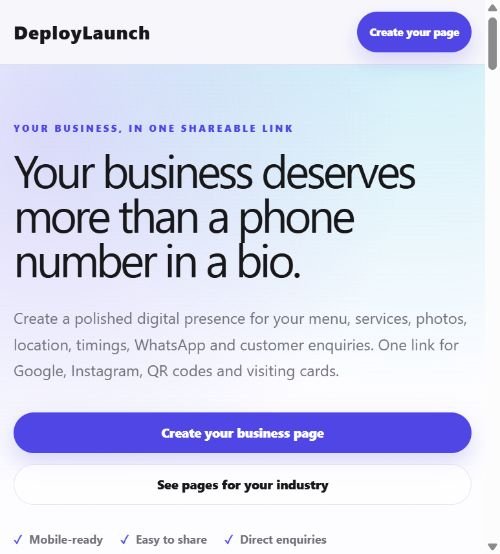
DeployLaunch brings offerings, photos, location, hours and contact actions into a shareable business page, with entry points for different kinds of local businesses.

- Relationship
- Own product
- Contribution
- Built from scratch
- Focus
- Business presence
01 / THE PRODUCT TASK
DeployLaunch,
in context.
Local businesses and independent service providers that need a clear public place for the details customers ask about before making contact.
A business page needs to explain the offering, provide practical details and give visitors a clear way to get in touch. DeployLaunch brings those tasks into one shareable destination, with examples for different industries.
An own product by Rahul Kushwaha, built from scratch. This walkthrough focuses on the public experience and the tasks it brings together.
02 / A CLOSER LOOK
Follow the
product journey.
How the interface guides someone from their starting point to the next useful action.
A view of connected product tasks- 01
Bring the essential details together
The page model groups services or products, photos, location and opening hours. These details give a visitor useful context before choosing a contact action.
- Starting point
- The business offering, approved images, location, hours and contact information.
- Next step
- A page structure that groups the offering with the practical details a customer needs.
- 02
Choose a relevant business context
Industry-specific routes introduce uses such as restaurant menus, service listings and courses. They show which information belongs in a page for each kind of business.
- Starting point
- The type of business and the information its customers need to compare or understand.
- Next step
- A route to the relevant industry description and the information that belongs in that experience.
- 03
Make the next action clear
Call, WhatsApp, directions and enquiry entry points connect the business details to a next action. A single shareable link gives the page a clear destination across those channels.
- Starting point
- A visitor ready to ask a question, contact the business or plan a visit.
- Next step
- Contact-action examples and a shareable-page concept connected to the business details.
03 / WHAT WAS BUILT
One product.
Connected tasks.
The public experience brings these pieces together.
- 01
A public product website explaining the business-page offer
- 02
Industry-specific entry routes and business-use descriptions
- 03
A page model combining offerings, practical details and contact actions
- 04
A public setup overview and entry points for creating a page
THE SCOPE IN VIEW
What this
walkthrough covers.
- This story focuses on the public business-page experience, industry entry routes and contact actions.
- Business pages and enquiry actions do not establish checkout, payment handling, live inventory or a complete CRM. Those capabilities are not claimed in this story.
KEEP EXPLORING / ANOTHER OWN PRODUCT
YOUR NEXT BUILD
A useful product starts
with a clear task.
Tell us who will use it, what they need to do and which systems it should connect to. We’ll work through the requirements and agree the scope.
Discuss your projectView all work